


 Download Product Ebook
 View all our solutions
 Sky-Walker Architecture
 View all our integrations
 Book Protocol workshop
 Our Company
 Contact Us
 View All Our Case Studies
 Become a PSIM Partner
 Become a Sky-Walker PSIM partner today!
 English
 Français
 Nederlands
Video Management Software for Comprehensive Surveillance & Incident Response
Unified video surveillance management across your entire facility. Sky-Walker's Video Management Software (VMS) centralizes CCTV footage from all cameras, enabling real-time monitoring, incident investigation, and coordinated security response from one intuitive interface.
What is Video Management Software?
Video Management Software (VMS) is a centralized platform that connects, monitors, and manages all CCTV cameras and video surveillance systems within a facility. It captures video footage, displays live streams and recorded video, and enables operators to investigate incidents with comprehensive visual documentation.
Core VMS Capabilities
- Multi-Camera Management: Connect and manage dozens or hundreds of cameras from a single platform.
- Live Video Streams: Display real-time camera footage on operator monitors and video walls.
- Video Recording & Playback: Record all video footage and retrieve recorded sequences for investigation.
- Multi-Manufacturer Support: Integrate cameras from multiple vendors and camera models simultaneously.
- Advanced Camera Features: Support integrated video processing, motion detection, and video analytics.
- Incident Investigation: Search, review, and analyze video footage for security and incident analysis.
- Centralized Monitoring: One unified interface replaces multiple vendor-specific applications.
- Integration with Security Systems: Coordinate video with access control, alarms, and incident response.
Why Video Management Software Matters
- Complete Facility Visibility: Monitor all cameras simultaneously from a centralized dashboard. No blind spots, no missed incidents.
- Multi-Manufacturer Integration: Connect cameras from any vendor. One unified platform manages diverse video surveillance systems.
- Real-Time Incident Detection: Operators identify threats instantly through live video feeds, detailed camera imagery, and automated alerts.
- Forensic Investigation Support: Record, review, and analyze video sequences for incident investigation, security analysis, and evidence collection.
The video management software features
The video management software for cctv has a multitude of video-specific features. In fact, all the software's features will allow you to have a global vision of your building's video surveillance system.
Alarm handling
Resolve alarms on your systems via the alarm manager
Video Management systems
Monitor and control your fire management systems
Video wall
Visualise your video systems with the cameras installed in your infrastructure via the video wall
User management
Manage the rights of your users and decide on the actions of each one
Incident manager
Predefine the manual or automatic actions to be taken during an incident via workflows
Reports and statistics
Generate reports and statistics on your incidents but also on your systems
Camera Types & Features Supported
Standard CCTV Cameras
Traditional and IP-based surveillance cameras from major manufacturers.
- Fixed Cameras: Stationary surveillance of specific areas and entry points.
- Pan-Tilt-Zoom (PTZ) Cameras: Operators control camera movement and zoom for dynamic monitoring.
- Dome Cameras: Discreet surveillance in retail, office, and public spaces.
- Bullet Cameras: Visible deterrent cameras for high-security areas.
- Thermal Cameras: Night vision and heat-signature detection for perimeter and emergency response.
- IP Cameras: Network-based cameras for modern networked surveillance systems.
- Analog Cameras: Legacy camera integration for facilities with existing analog systems.
Advanced Camera Features
Intelligent capabilities integrated into VMS.
Motion Detection: Automatic alerts when movement is detected in monitored areas.
- Video Analytics: AI-powered analysis identifying people, vehicles, abandoned objects, and unusual activity.
- Object Tracking: Automatic following of persons or vehicles across multiple cameras.
- License Plate Recognition: Automated vehicle identification and tracking.
- Face Detection & Recognition: Identify individuals and match against watchlists.
- Crowd Density Monitoring: Alert operators when occupancy thresholds are exceeded.
- Behavioral Analysis: Detect unusual activity patterns and suspicious behavior.
Measurable Benefits of Video Management Software
Used to ensure optimal safety in your building, the vms will provide you with real advantages because it is specific to video surveillance. Your building will be under 100% control.
VISIBILITY & CONTROL
Comprehensive Situational Awareness
Real-time visibility into all facility areas enables rapid threat identification and response coordination.
Centralized Monitoring Control
One unified interface replaces vendor-specific applications, simplifying operations and reducing training requirements.
Multi-Manufacturer Flexibility
Integrate cameras from multiple vendors without vendor lock-in. Upgrade cameras independently without platform replacement.
Integration with Security Response
Video coordinates with access control, alarms, and incident management for comprehensive emergency response.
PROTECTION & PREVENTION
Asset & Property Protection
Deter theft and vandalism. Investigate incidents with definitive video evidence.
Enhanced Occupant Safety
Comprehensive surveillance deters criminal activity and enables rapid response to safety threats.
SPEED & EFFICIENCY
Reduced Response Time
Operators identify threats immediately through live feeds rather than waiting for incident reports.
Operator Efficiency
Automated alerts and analytics reduce operator workload and improve threat detection accuracy.
Enhanced Occupant Safety
Comprehensive surveillance deters criminal activity and enables rapid response to safety threats.

INVESTIGATION & COMPLIANCE
Incident Investigation & Resolution
Video evidence clarifies circumstances, identifies perpetrators, and supports incident documentation and legal proceedings.
Legal Compliance & Documentation
Recorded evidence supports workplace investigations, insurance claims, and legal proceedings.
Who is involved in the use of a video management software
The video management software is a platform that will allow you to perform many tasks. Normally the control room operators will use the software, but the safety officer and the management can use it to get information about the building.
Operators
The operator controls the security and safety of the building thanks to the software. Indeed, he has a real time view of all the cameras in the building and can decide to carry out a survey in case of a potential incident.
Security managers
Its mission is mainly to set up processes, whether manual or automatic, to manage the various incidents occurring in the building. Indeed, the processes (workflows) will enable actions to be established in a very organised manner in order to respond as effectively as possible to the incident.
Board members
The management team will mainly measure the impact of actions on the safety of the building and take the necessary measures to optimise safety, in cooperation with the safety manager. Indeed, safety in a building is one of the most important elements and it is essential to be able to make improvements to improve the results of the actions.
What does our Sky-Walker VMS platform look like?
The video management software is mainly composed of 2 screens. On the first screen, you have the visualization of your building with the floors and video surveillance systems represented as icons. In the event of an alarm, an alarm stamp will be highlighted and will allow you to carry out the investigation.
On the second screen, you have the possibility of visualizing in real time the images sent by your system of cctv. Indeed, depending on the cameras selected, you will be able to display up to 4 camera images on the interface. The time and date are also present on the images in order to have all the information available in case of incidents.
Both interfaces of the two screens are 100% customisable, whether it is the fire cctv systems with their icons, the number of buildings and floors, the manual or automatic processes, the number of cameras, etc...
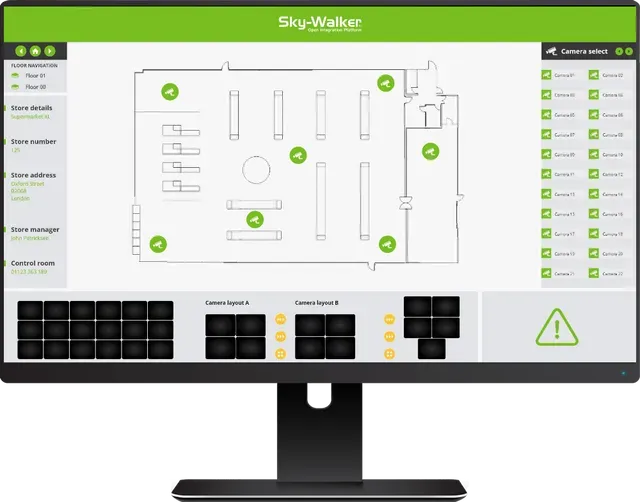
Sky-Walker video management software
Frequently Asked Questions
Can VMS integrate cameras from multiple manufacturers?
Yes. Sky-Walker VMS integrates cameras from any manufacturer using standard protocols (RTSP, HTTP, ONVIF). No vendor lock-in.
What happens if the network fails?
Local video recorders (NVRs) continue recording. VMS functionality is reduced but essential video capture continues
How do I export video evidence?
VMS provides easy export of video clips to standard video formats for evidence documentation and investigation.
Can multiple operators view the same cameras?
Yes. Multiple operators can simultaneously view the same cameras. Role-based permissions control which users can control cameras.
How do I search recorded footage?
Search by date/time, camera location, or motion detection alerts. Retrieve specific incidents in seconds.
What video analytics are supported?
Sky-Walker is not an AI-based platform. However, it fully supports advanced analytics capabilities through compatible IP cameras that feature built-in artificial intelligence. So its able to detect motion,object tracking, license plate recognition, face detection, crowd density monitoring, and behavioral analysis. it's